No hand-written shaders
The Concept
Materials are authored as node graphs — you never write or translate shaders by hand. The graph is stored inside the material asset; the engine generates the shader from it and cross-compiles it for every backend, so the same material runs and looks identical on Metal, OpenGL, Direct3D and Vulkan. The node editor is the shader authoring surface.
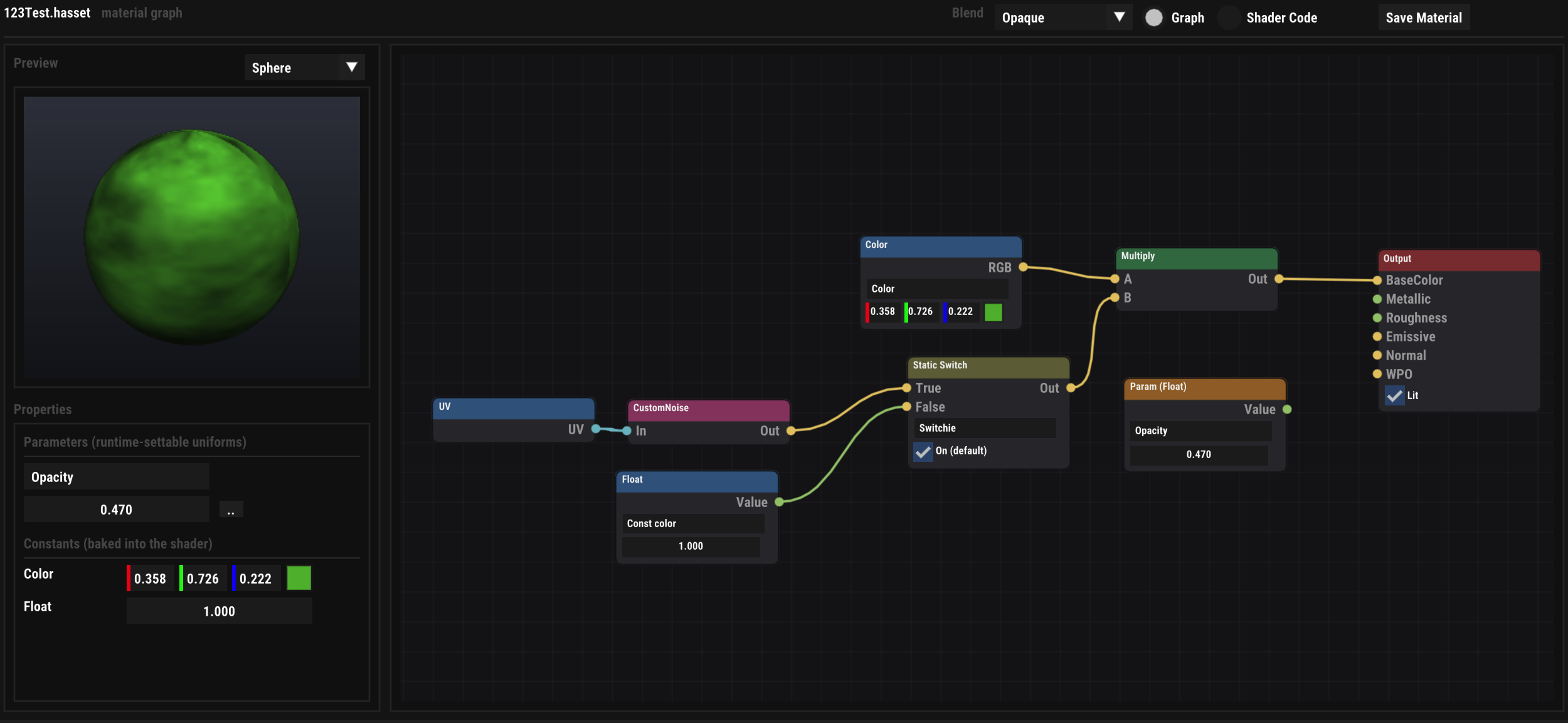
The editor shows a live preview (sphere or other primitives), the material's runtime-settable Parameters and baked Constants, a Blend mode (opaque / transparent), and a Shader Code view of the generated source for the curious.
Under the hood
Compilation Pipeline
- Each renderer caches the compiled pipeline per shader hash — identical graphs share one pipeline; edits apply live in the scene.
- Lit materials go through the engine's standard-lit shading
(
heLit): sun, ambient and specular are engine-driven, so lighting matches the rest of the scene on every backend. - Exports can precompile the shader variants for the target backends into the asset, so a packaged game never generates shaders at runtime.
Hands on
Using the Editor
- Double-click a material in the Content Browser to open its graph tab.
- Right-click the canvas for the searchable node palette (type to filter nodes and project material functions).
- Drag from pin to pin to connect — types coerce automatically (float splats to vectors, vec3 → vec4 gains alpha 1). Right-click an input pin to disconnect.
- Edits apply live; Save Material persists graph + generated shader + parameters into the asset.
- Assign the material to entities via the Material component (drag & drop).
Toolbox
Node Library
| Category | Nodes |
|---|---|
| Material | Output — BaseColor, Metallic, Roughness, Emissive, Opacity, Normal, WPO; Lit/Unlit toggle. |
| Input | Float, Color, Vertex Color, Normal (WS), UV, Time, World Position, View Direction. |
| Parameter | Param (Float), Param (Color) — named, exposed as uniforms; the basis for runtime-driven materials. |
| Math | Add, Subtract, Multiply, Divide, Lerp, One Minus, Power, Saturate, Dot, Sine, Abs, Fract, Smoothstep, Step, Normalize. |
| Channels | Split RGBA, Combine RGBA, Combine XYZ. |
| Texture | Texture Sample (RGB + separate Alpha pin), Panner (time-animated UVs). |
| Procedural | Noise (value noise), FBM Noise (4 octaves), Checker. |
| Shading | Fresnel — per-pixel view-direction rim. |
| Switches | Static Switch — compile-time branch between two inputs. |
| Function | Function Input, Function Output, Material Function (call). |
Live values
Parameters & Overrides
Param nodes become entries in a small uniform block the engine uploads per material — changing a parameter value never recompiles the shader. Three places drive them:
- The material asset — the default values, edited in the graph tab's Parameters panel.
- Per entity — the Material component holds parameter overrides, so two entities can share one material with different colours.
- At runtime —
horizon.setMaterialParam(entity, "Opacity", 0.5)from Lua/Python, thematerial.setParamEngine Call from HorizonCode. UI widget elements support the same via their material slots.
Unconnected values shown under Constants are baked into the shader — free at runtime, but changing them recompiles (cached, so it only happens once per variant).
Reuse
Material Functions
Reusable sub-graphs stored as their own assets
(Create ▸ Material Function in the Content Browser). A
function's interface is defined by its
Function Input / Function Output nodes
(each named and typed). Any material — project-wide — can insert
it from the palette; the call node shows the function's pins and
the compiler inlines the body into the generated
shader, so functions have zero runtime cost. Recursion is
detected and rejected safely.